PRESENTER & SESSION CHAIR INFORMATION
ORAL PRESENTATION
GUIDELINES
The Oral Presentation Guidelines will be available soon. This document will include everything you need to prepare for your presentation at INTER-NOISE 2026, including presentation timing, slide preparation and submission, audiovisual information, and other important details to help ensure your presentation runs smoothly. Please check back soon for the full guidelines.
POSTER PRESENTATION
GUIDELINES
The Poster Presentation Guidelines will be available soon. This document will include everything you need to prepare for your poster presentation at INTER-NOISE 2026, including poster specifications, display and installation instructions, presentation times, and other important information to help ensure a successful poster presentation. Please check back soon for the full guidelines.
SESSION CHAIR
GUIDELINES
For session chairs, please download the guidelines below to familiarise yourself with your role and responsibilities ahead of INTER-NOISE 2026. The document contains everything you need to ensure your session runs smoothly, including preparation, timing, speaker introductions, Q&A management and post-session requirements.
ADELAIDE CONVENTION CENTRE (ACC) INFORMATION
From Speaker Support Information
How to manage your Concurrent Session(s) – Generation of Hyperlinks
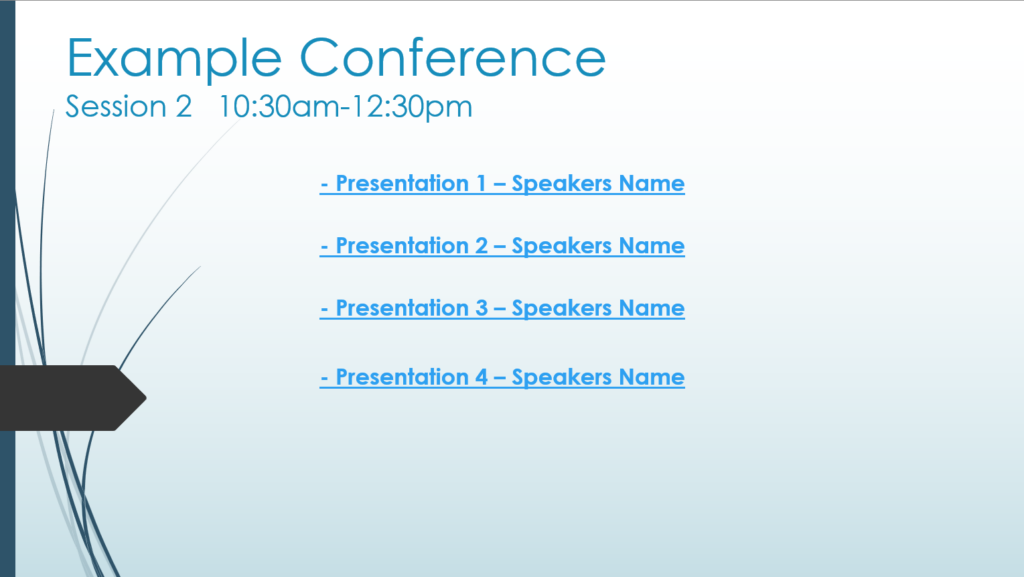
For session rooms without a dedicated operator, a simple navigation solution can be implemented using session title slides. For each session a holding slide should be supplied showing the presentation name and presenters name in order. This text can then be hyperlinked to the associated presentations by the SSC technician.
For concurrent rooms, title slides with hyperlinks can be created for quick navigation. Each session can have a holding slide with each presenter’s name and presentation title/subject.
This allows presenters to simply click on their name on the laptop at the lectern to open their presentation. Once their presentation is finished, advancing to the next slide will return to the title page ready for the next presenter.
One advantage of this setup is never needing to exit Power Point and search for presentations.
Stand-by technicians are also on hand to check hyperlinks and presentations in each room, they are stationed outside in the immediate foyer and can provide support for up to three concurrent rooms.
For more information, click on the Adelaide Convention Centre (ACC) document below.